Integrating Graphite Watercolor Backgrounds into Professional Design Workflows
In the landscape of digital design and physical crafting, texture serves as the silent anchor that grounds a visual composition. While vibrant colors often demand immediate attention, it is the subtle interplay of light, shadow, and surface quality that determines whether a design feels authentic or artificial. Watercolor Backgrounds - Graphite represents a specialized resource designed to bridge the gap between traditional artistic aesthetics and modern digital efficiency. This collection is not merely a set of images; it is a functional asset for creators who require consistency, elegance, and versatility across various media formats.
For professionals ranging from small business owners to freelance graphic designers, the challenge often lies not in finding inspiration, but in executing it efficiently without sacrificing quality. The graphite watercolor aesthetic offers a neutral, sophisticated foundation that supports rather than competes with primary design elements. By understanding how to integrate these high-resolution textures into your existing workflow, you can streamline production times while elevating the perceived value of your final output.
The Strategic Value of Neutral Textures
When planning a creative project, whether it is a brand identity package, a wedding invitation suite, or a series of social media graphics, the background sets the tonal context. Graphite grey tones occupy a unique space in color theory. They are darker than standard white or cream paper textures, providing better contrast for white or light-colored typography, yet they remain neutral enough to allow accent colors to pop without clashing.
The Graphite Watercolor Backgrounds collection leverages this neutrality. The soft washes mimic the organic unpredictability of hand-painted art, introducing a human touch to digital designs. This is particularly crucial in an era where audiences are increasingly drawn to authenticity and handmade qualities. By using these backgrounds, you inject a sense of craftsmanship into your work before you even place your first text box or logo.
From a practical standpoint, neutral backgrounds reduce cognitive load for the viewer. They do not distract. Instead, they guide the eye toward the foreground content. For educators creating worksheets, marketers designing lead magnets, or entrepreneurs building product labels, this clarity is essential. The calm, modern look ensures that the message remains the focal point, supported by a backdrop that suggests professionalism and attention to detail.
Workflow Integration: From Concept to Final Export
Implementing these assets into your daily routine requires a shift from viewing them as mere decorations to treating them as foundational layers. Here is how Watercolor Backgrounds - Graphite fits into different stages of the creative process.
Preparation and Asset Management
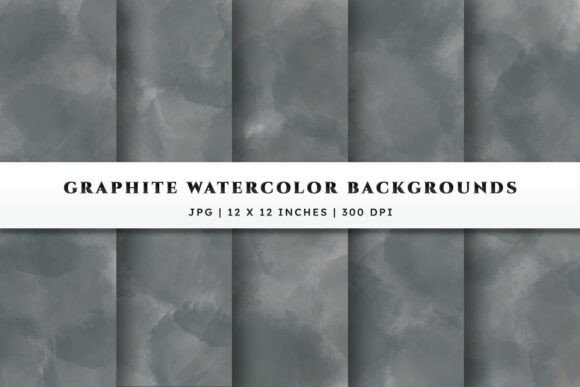
Efficiency begins with organization. Upon purchasing the collection, you will receive a ZIP file containing five distinct backgrounds. The first step in your workflow should be extraction and proper filing. Create a dedicated folder in your digital asset library labeled "Textures - Graphite Watercolor." Since each file is a high-quality JPG at 300 DPI and 12x12 inches, they are ready for both screen and print use immediately.
Before starting a new project, review the five variations. Note the differences in the density of the graphite wash and the distribution of the watercolor blooms. Some may have heavier concentrations of dark grey in the corners, which are ideal for framing central content. Others may offer a more even, mist-like distribution, suitable for full-bleed backgrounds. Selecting the right variant early prevents mid-project adjustments.
Design Execution for Print Products
For scrapbookers, Cricut and Silhouette users, and printable designers, the resolution and dimensions are critical. The 12x12 inch format is the industry standard for scrapbooking pages and many craft projects. At 300 DPI, these files ensure that when printed, the soft gradients of the graphite grey remain smooth, without pixelation or banding.
When designing invitations or greeting cards, place the graphite background as your base layer. Because the tones are deep yet soft, white ink or foil stamping effects simulated in digital design will stand out sharply. If you are using cutting machines, consider printing the background on high-quality cardstock first, then using your machine to cut out intricate shapes or text overlays. The texture provides a premium feel that plain white cardstock cannot replicate, adding perceived value to handmade goods sold by small business owners.
Digital Branding and Social Media
In the digital realm, consistency is key to brand recognition. These backgrounds can serve as a template base for Instagram posts, Pinterest pins, or eBook covers. The neutral grey palette works exceptionally well with minimalist branding strategies. You can overlay semi-transparent shapes, bold sans-serif typography, or delicate line art illustrations.
For bloggers and content creators, using a consistent background texture across your featured images creates a cohesive visual identity. When a user scrolls through your feed, the recurring motif of the graphite watercolor wash signals your brand presence before they even read the headline. This subtle repetition builds familiarity and trust.
Compatibility and Technical Considerations
One of the strengths of the Watercolor Backgrounds - Graphite set is its universal compatibility. As high-resolution JPG files, they can be opened and manipulated in virtually any design software, from professional suites like Adobe Photoshop and Illustrator to user-friendly platforms like Canva, Procreate, and Silhouette Studio.
However, understanding the limitations of the JPG format is important for advanced workflows. JPGs are raster images with a flat background. Unlike PNGs with transparency, you cannot simply remove the white areas if the watercolor wash does not cover the entire canvas. Therefore, it is best to use these images as full-background layers. If you need to blend the edges into another color, use the gradient tool or masking features in your software to soften the transition between the graphite texture and your document’s edge.
For those using Cricut or Silhouette machines, remember that these backgrounds are for print-then-cut projects. You cannot cut the watercolor texture itself as a vector shape. Instead, print the design on your chosen material, then use the machine to cut around specific elements placed on top of the background.
Enhancing Professional Quality Through Texture
The difference between an amateur and a professional design often lies in the details. Flat, solid colors can feel sterile. Adding a textured layer like graphite watercolor introduces depth and complexity. It mimics the way light interacts with physical paper, giving digital files a tactile quality.
This is particularly effective for branding elements such as business cards, letterheads, and packaging labels. A label with a subtle graphite wash suggests a premium, artisanal product. It implies that care was taken in the presentation, which can influence consumer perception and willingness to pay. For freelancers pitching to clients, including mockups that utilize these textures can demonstrate a higher level of design sophistication.
Long-Term Utility and Versatility
Investing in versatile assets pays dividends over time. Unlike trend-specific graphics that may look dated in a year, neutral graphite tones are timeless. They pair well with pastels, bright primaries, metallics, and monochrome schemes. This adaptability means you will return to this collection repeatedly for diverse projects.
- Invitations: Use for weddings, corporate events, or birthdays where elegance is required.
- Educational Materials: Create calming worksheets or presentation slides that reduce visual stress.
- Product Photography: Use as a digital backdrop for flat-lay photos of jewelry, stationery, or cosmetics.
- Web Design: Incorporate as section backgrounds on websites to break up white space without overwhelming the user.
By keeping these files organized and readily accessible, you reduce the time spent searching for suitable backgrounds. This efficiency allows you to focus more on creative decision-making and less on technical setup. Whether you are a hobbyist looking to elevate your personal projects or a business owner aiming to refine your brand’s visual language, Watercolor Backgrounds - Graphite provides a reliable, high-quality foundation. The seamless blend of traditional artistry and digital convenience makes it an indispensable tool for modern creators seeking polished, professional results.